Multimodal AI Context · scripted
Multimodal AI Context
Multimodal context
We have looked at how we can provide our notes, answers to questions, or other text to give AI context. Context is critical. It is how AI gets the information it needs to do the work correctly. Now we are going to look at multimodal context, which is context that is not just words.
Multimodal context means context that comes in more than one form. Text is one form. A picture is another. Most AI tools now accept pictures, so we can provide a photo or a drawing as context, and AI can use what it sees in the picture the same way it uses what it reads in our text.
Pictures are useful as context because they contain information we would not have typed. When we describe a situation in words, we write down only what we noticed and thought was important. A photo contains everything in the frame. That includes things we did not notice and things we did not know mattered.
Pictures are also useful because they let us quickly show AI what is around us in the physical world. AI knows a great deal about how things work in general. A picture lets it connect that knowledge, and whatever we tell it, to the actual things in front of us: this stove, this schedule, this pile of receipts. That is our physical context. When AI understands our physical context, it can tailor the work it does to our situation instead of giving a general answer. The more AI knows about the real world around us, the more useful its work is.
Here is an example. We have a few ingredients on the counter and want to know what to make. Typing them out is possible. A photo is faster and leaves nothing out.
What can I make for dinner with what is here? Give me a recipe.
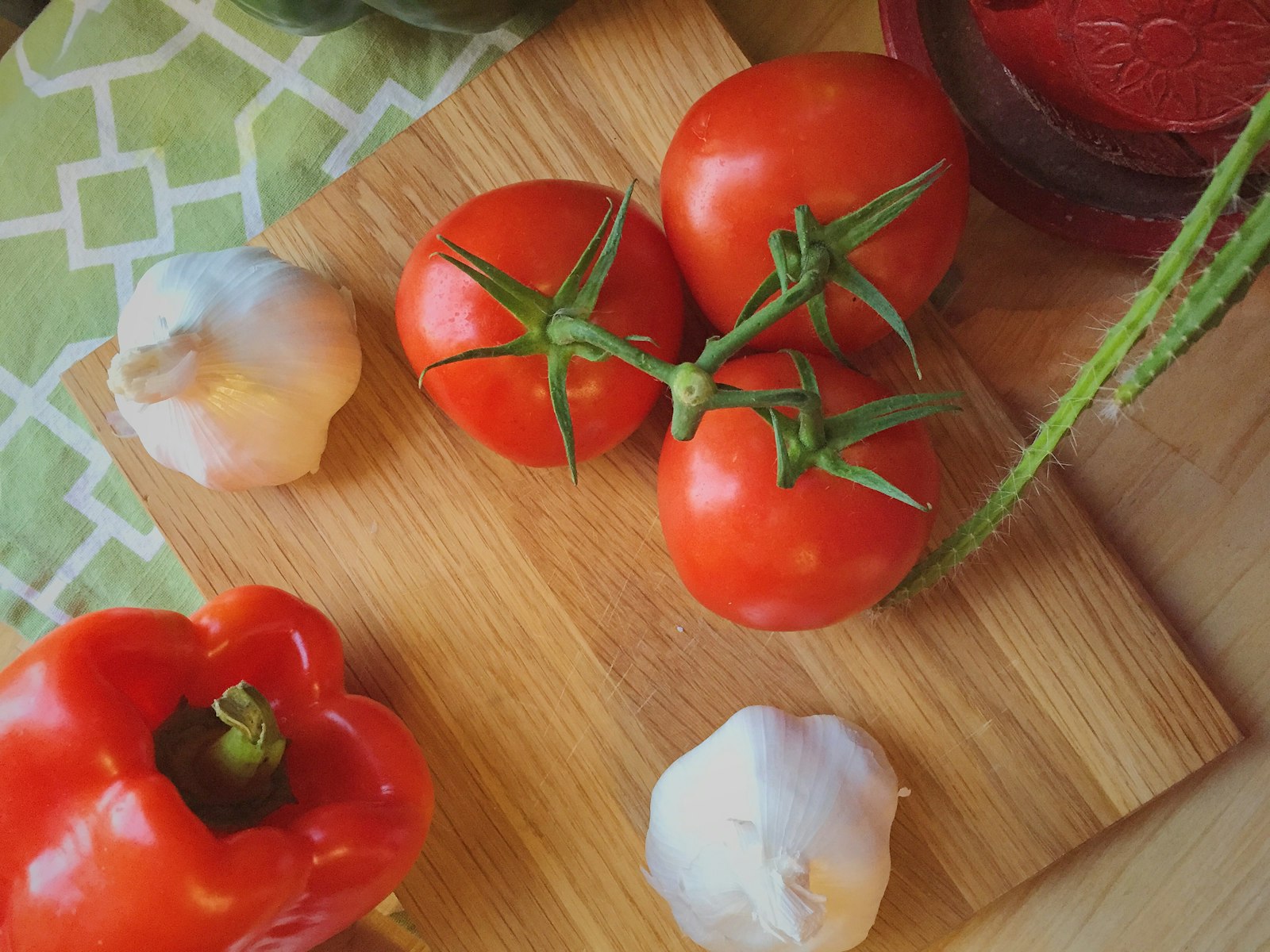 📷 ingredients on a cutting board
You have three tomatoes on the vine, two whole heads of garlic, a red bell pepper, and part of a green pepper at the edge of the board. That is the start of a roasted tomato and pepper pasta sauce. I am assuming you have pasta, olive oil, and salt in the pantry.
Roasted tomato and pepper pasta (serves 2)
Ingredients
- 3 tomatoes, quartered
- 1 red bell pepper, cut into strips (add the green pepper if you want more)
- 6 garlic cloves, peeled (about half of one head)
- 3 tablespoons olive oil
- 1 teaspoon salt, plus salt for the pasta water
- 8 ounces pasta, any shape
Steps
- Heat the oven to 425°F.
- Put the tomatoes, pepper strips, and garlic cloves on a sheet pan. Toss with the olive oil and salt.
- Roast 25 to 30 minutes, until the pepper edges are charred and the tomatoes have collapsed.
- While they roast, cook the pasta in salted water. Save half a cup of the pasta water before you drain it.
- Scrape everything from the sheet pan into a bowl, including the juices. Mash with a fork until it is a chunky sauce.
- Toss the pasta with the sauce, adding pasta water a little at a time until it coats the noodles.
If you have any cheese, grate it over the top. If you have a lemon, a squeeze at the end brightens the sauce.
Nobody typed "part of a green pepper at the edge of the board." AI saw it in the photo and worked it into the recipe. It also said what it assumed we had in the pantry, so we can correct it if we do not.
Once AI can see a picture, there are many things we can ask it to do with what it sees. This lesson goes through five of them, from the simplest to the most surprising.
1. Extract information
One thing we can ask AI to do is to extract information based on the context in the picture. To extract means to pull out the pieces of information we want and leave the rest. We ask AI to identify every item of one kind in the picture and put them in a useful form, such as a table.
Create an inventory of what you can see in my fridge so I can avoid buying groceries I already have.
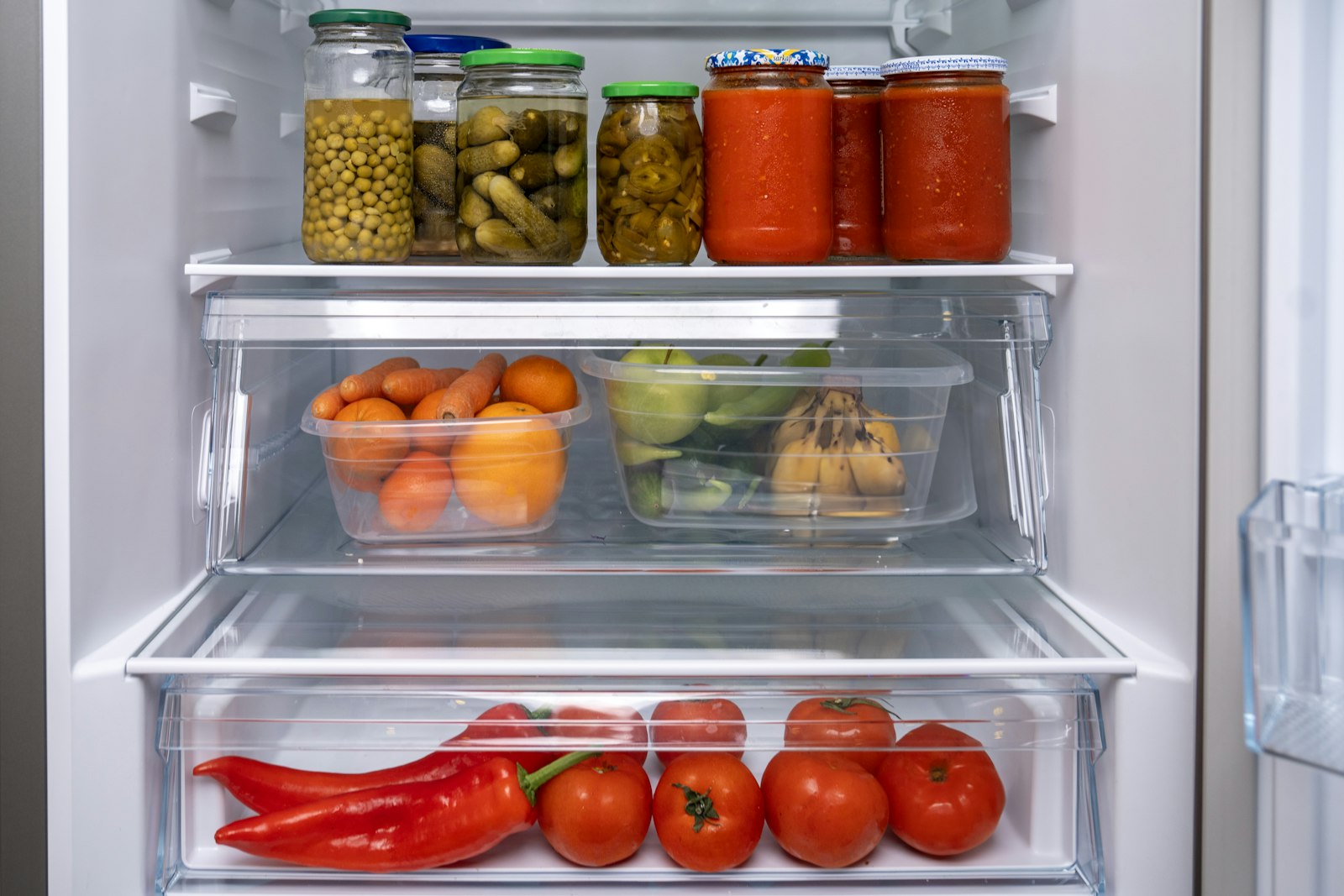 📷 the inside of my fridge
| Where | Item | How much |
|---|---|---|
| Top shelf | Chickpeas in brine, jar | 1 jar |
| Top shelf | Pickled cucumbers | 2 jars, one small pickles and one larger gherkins |
| Top shelf | Pickled pepper slices (jalapeño style) | 1 jar |
| Top shelf | Tomato sauce or passata | 3 jars |
| Middle drawer | Carrots | About 4 |
| Middle drawer | Oranges or tangerines | About 5 |
| Middle drawer | Green apples or pears | About 3 |
| Middle drawer | Bananas | 1 small bunch |
| Bottom drawer | Long red peppers | 2 |
| Bottom drawer | Tomatoes | 5 |
Before you shop: you do not need tomato sauce, pickles, tomatoes, or peppers. You are low on fresh vegetables other than carrots, and I do not see any dairy, eggs, or drinks. The door shelves are mostly out of the frame, so check them before you decide those are missing.
We asked for an inventory. AI produced one from what it could see, organized by shelf. It also said what it could not see, the door shelves, instead of guessing at them.
Receipts are another common thing to extract from. A photo of a pile of receipts has everything we need for an expense record, mixed in with everything we do not.
Here are my receipts from the weekend. Extract the date, store, total, and a category for each one into a table, and total it by category.
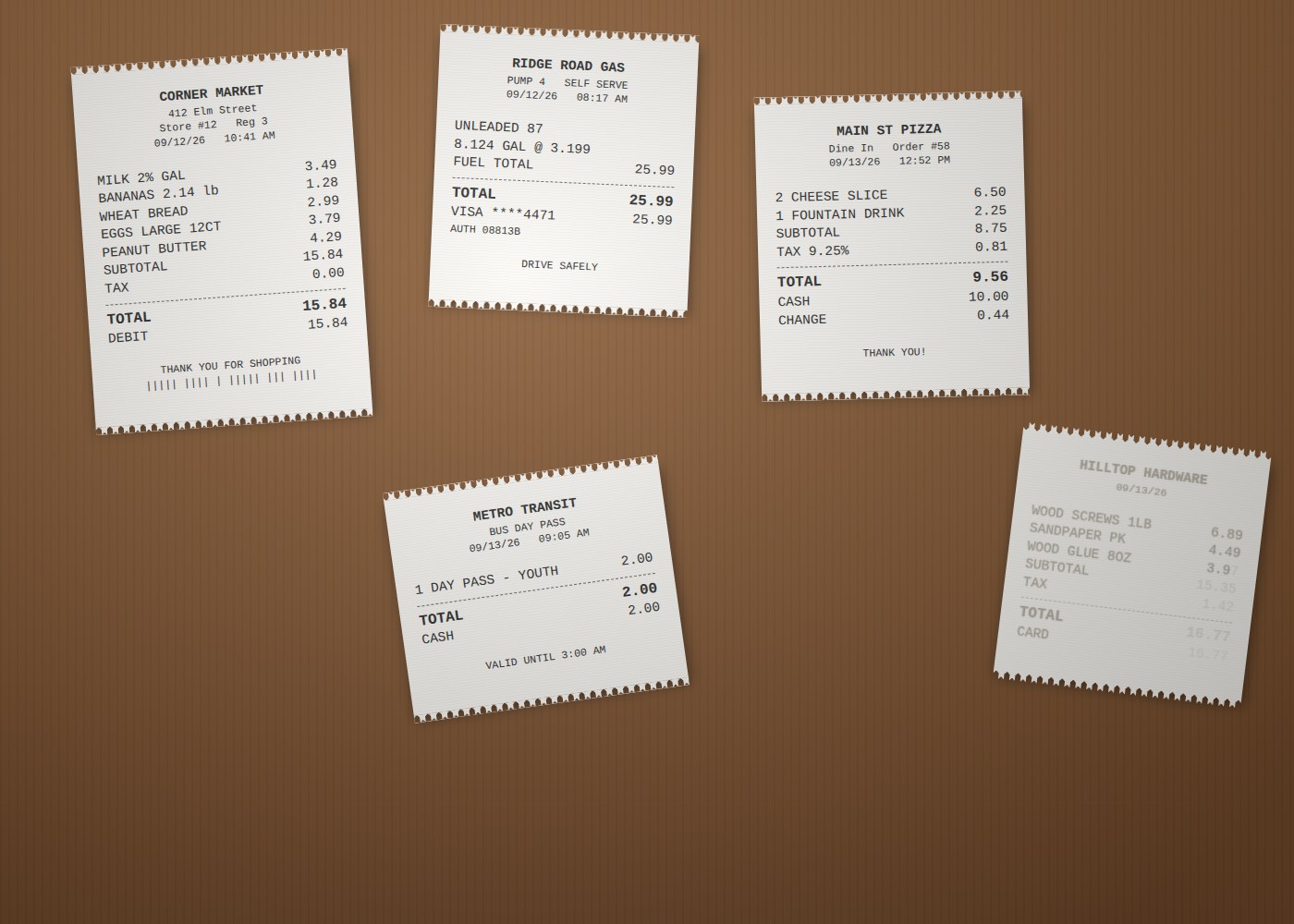 📷 five receipts on a table
| Date | Store | Category | Total |
|---|---|---|---|
| 09/12/26 | Corner Market | Groceries | 15.84 |
| 09/12/26 | Ridge Road Gas | Fuel | 25.99 |
| 09/13/26 | Main St Pizza | Food | 9.56 |
| 09/13/26 | Metro Transit | Transportation | 2.00 |
| 09/13/26 | Hilltop Hardware | Supplies | unreadable |
By category
| Category | Total |
|---|---|
| Fuel | 25.99 |
| Groceries | 15.84 |
| Food | 9.56 |
| Transportation | 2.00 |
| Supplies | not included |
| Total of readable receipts | 53.39 |
The Hilltop Hardware receipt is faded. I can read the store name, the date, and the first two items (wood screws 6.89 and sandpaper 4.49), but the third item's price, the tax, and the total are too light to read with confidence. Check that one against the original or your card statement and I will add it.
Five receipts became one table. AI extracted the fields we asked for, assigned categories, and added up what it could read. It said exactly which numbers it could not read instead of guessing at them. That matters. A guessed total in an expense table looks just as tidy as a real one.
2. Interpret what is in a picture
To interpret means to work out what something means. AI can read a picture against a question we have. It can look at a schedule and find time. It can look at a machine and tell us how to use it. It can look at a plan we made and tell us what is wrong with it. All of these are interpretation.
Here is a common one. We have a calendar full of entries and need to find time in it.
I need to spend three hours studying for my chemistry exam, which is first thing next Monday. Here is my calendar for this week. When do you recommend?
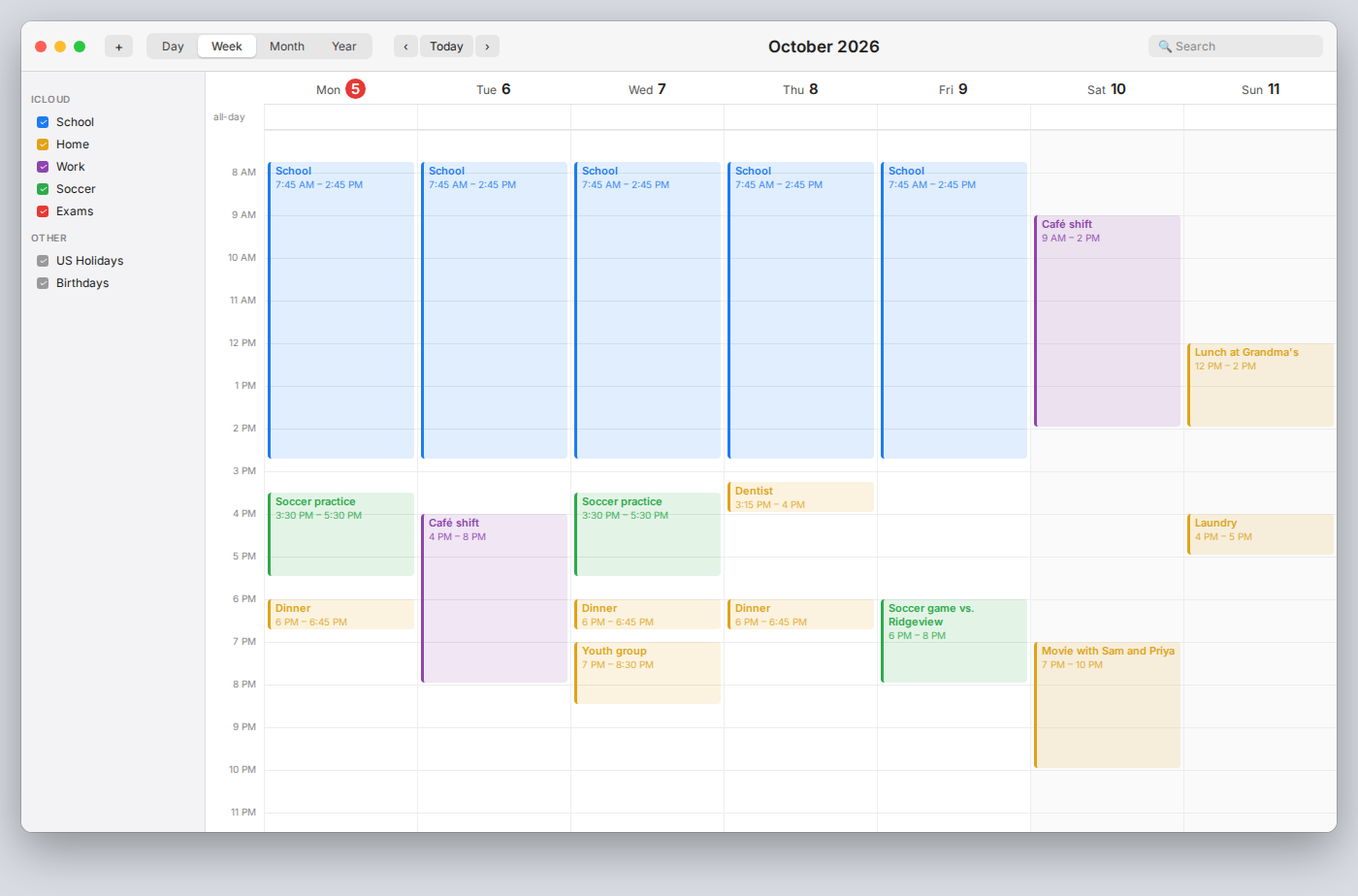 📷 my calendar, week of October 5
Looking at the week, your afternoons and evenings are mostly taken. Tuesday has the café shift until 8, Wednesday has practice and then youth group, and Friday has the game. The open time is Thursday after school, Saturday afternoon after your shift, and Sunday morning before lunch at Grandma's. Here is a plan that uses those three windows and keeps each session about an hour.
| When | Time | Why here |
|---|---|---|
| Thursday | 4:15 – 5:15 PM | Nothing after the dentist (3:15 – 4:00) until dinner at 6 |
| Saturday | 2:30 – 3:30 PM | Café shift ends at 2; free until the movie at 7 |
| Sunday | 9:30 – 10:30 AM | Free until lunch at 12 |
That is three hours, spread over three days so you are not cramming. If you want a fourth, short session, Sunday evening after 5 is open; use 20 minutes to review what you got wrong on Thursday and Saturday. I skipped Monday evening because today is Monday and you have practice, dinner, and the rest of the week's homework ahead of you.
AI read every entry in the screenshot: school every weekday, practice, the shift, the dentist, the game, the movie, lunch at Grandma's. Then it did the reasoning we would have done with a pen, faster: it found the gaps, checked each one against what came before and after it, and put the three hours where they fit. We did not type a single event. It read them.
A very common version of interpretation is "how do I use this?" We are standing in front of a machine with buttons and no instructions.
This is the washing machine at the place we are staying. How do I wash a load of dark clothes?
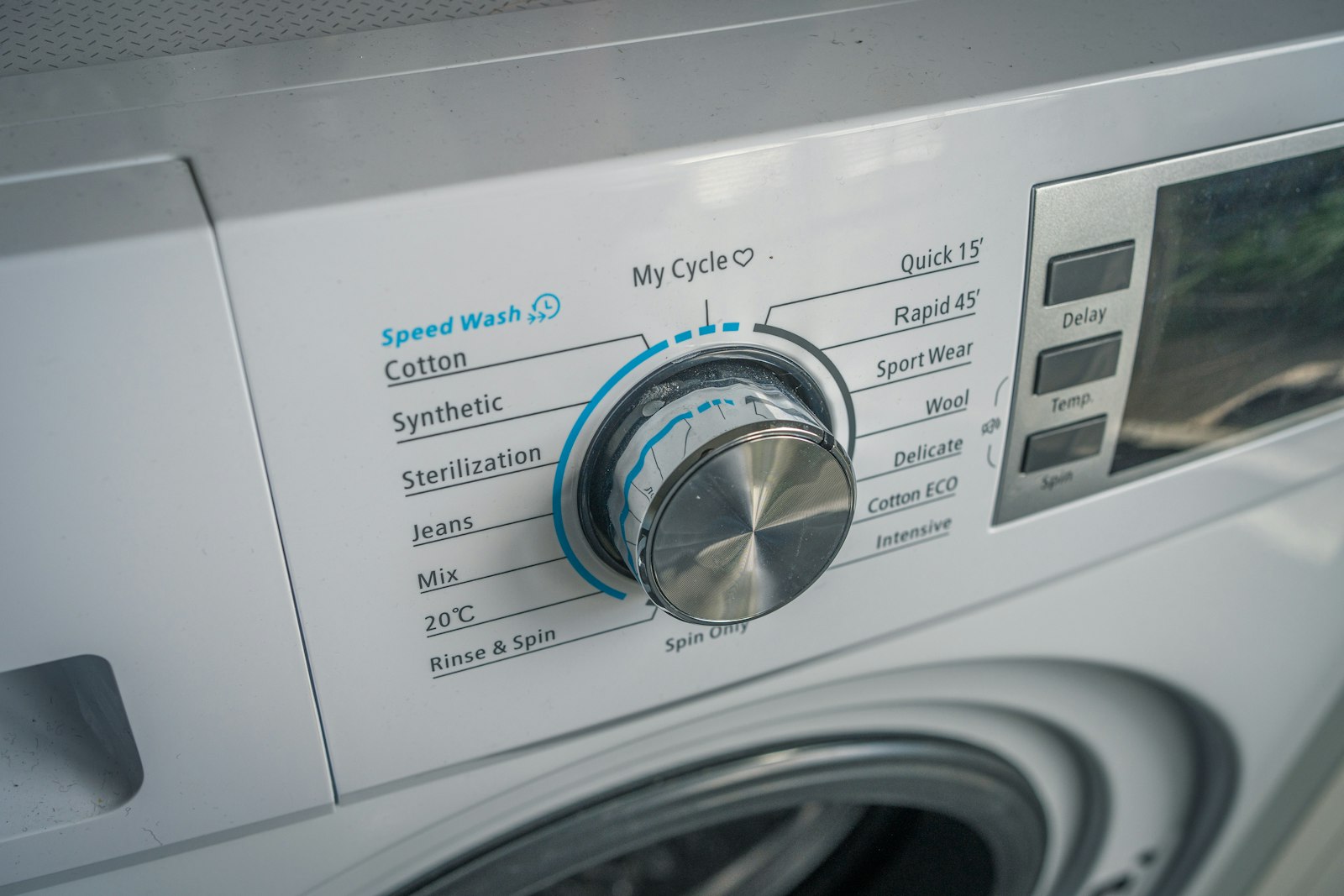 📷 the washing machine's control panel
This is a front-loader with a program dial in the middle and three buttons to the right: Delay, Temp., and Spin. For darks you want a cold or cool wash so the colors do not fade.
- Load the drum no more than about three-quarters full and close the door until it clicks.
- Put detergent in the drawer at the top left of the panel (the handle is visible at the left edge of your photo).
- Turn the dial to 20°C, on the lower left of the dial. That is a dedicated cold-water program and the safest choice for darks. If the load is mostly cotton and fairly dirty, turn the dial to Cotton instead and press Temp. until the display shows 30.
- Leave Spin at its default. Do not press Delay unless you want the machine to wait before starting.
- Press start. The start button is not in the frame; it is usually to the right of the display.
The other programs on the dial, such as Jeans, Sport Wear, Wool, and Quick 15', are for specific loads. Sterilization and Intensive run hot, so avoid them for darks.
AI recognized the kind of machine, read the labels on the dial and the buttons, and turned them into steps for the load we have. It also said which button it could not see rather than inventing one.
When the picture is something we made, we can ask AI to interpret it as a reviewer. This is the persona lesson applied to a photo. We give AI a role, and the role decides what it looks for.
Act as a travel planner and identify any gaps or problems with what I am proposing for my two-day trip.
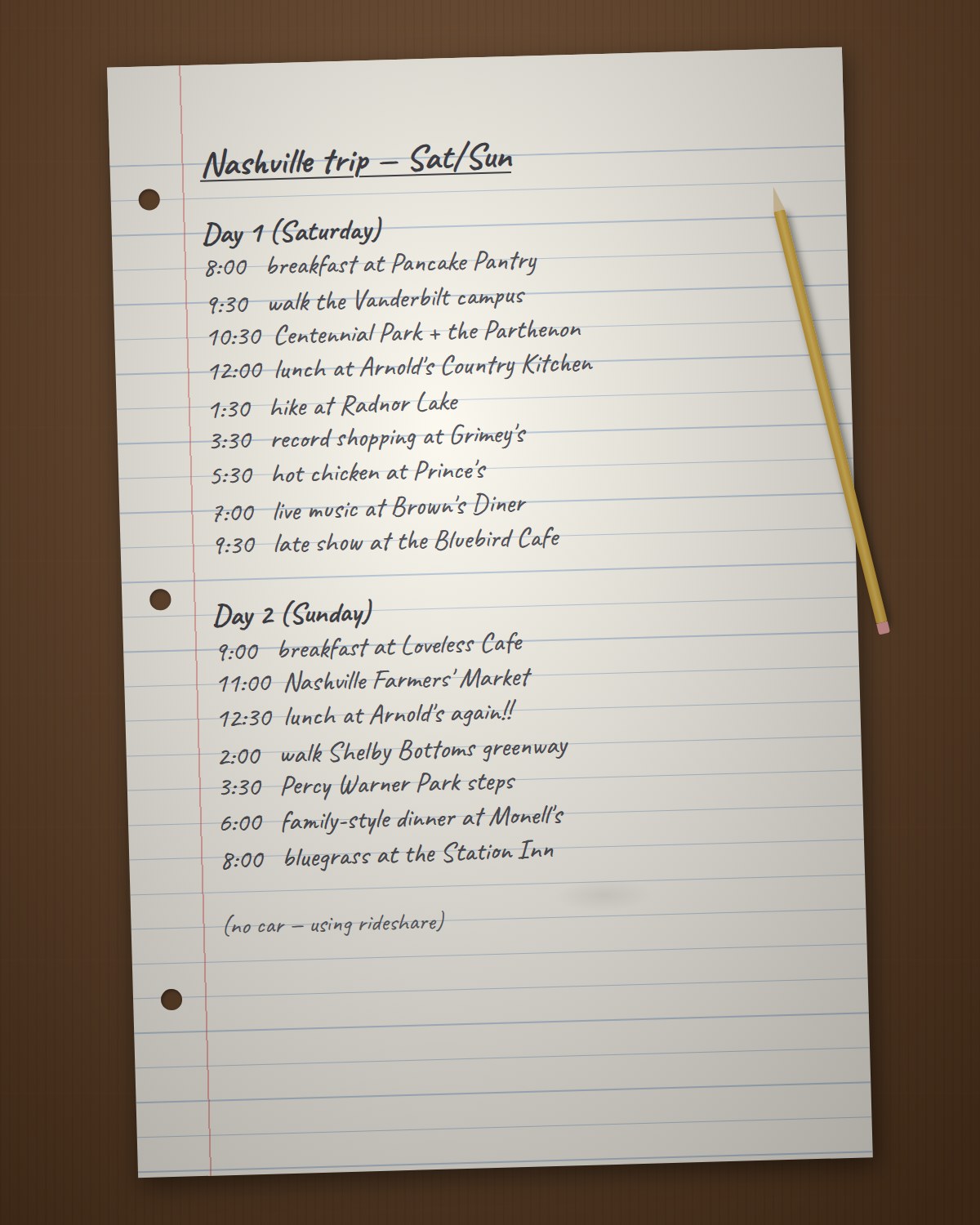 📷 my trip list, written in pencil
I can read the whole list. Here are the problems, biggest first.
1. Arnold's Country Kitchen is on your list twice, on Saturday and Sunday. Arnold's has historically served lunch only on weekdays and been closed on weekends. Check their current hours, but plan on both of those lunches falling through. If you want a meat-and-three on the weekend, look for one that is open weekends and swap it in.
2. The Bluebird Cafe is not a walk-in at 9:30. Seats are reserved online days in advance and go quickly. If you do not have a reservation already, this line is a hope, not a plan. Try for a reservation now, or replace it.
3. Saturday is too much. Nine stops from 8 a.m. to midnight, and they are in four different parts of town: Radnor Lake is far south, Grimey's is in East Nashville, Prince's is across town from Grimey's, and Brown's Diner is back near Vanderbilt. Without a car, each of those hops is a 20- to 30-minute rideshare. Drop Radnor Lake or Grimey's, and keep Brown's Diner and the Bluebird together since they are close to each other.
4. Pancake Pantry at 8:00 on a Saturday means a line. It is known for long weekend waits. Either get there when it opens or move it to a weekday if you are ever back. Vanderbilt and Centennial Park are right there, so the 9:30 and 10:30 stops are a good pairing once you are out.
5. Loveless Cafe at 9:00 on Sunday does not get you to the Farmers' Market by 11. Loveless is about 25 to 30 minutes southwest of downtown and also has weekend waits. Pick one: Loveless with a later morning, or breakfast closer in and the market on time.
6. Shelby Bottoms at 2:00 and Percy Warner at 3:30 are on opposite ends of the city. East Nashville to Belle Meade is a long ride, and the Percy Warner steps are a workout. Choose one walk.
7. Check the evening on Sunday. Monell's is worth it, but confirm they serve dinner on Sunday; some days they close after the afternoon seating. The Station Inn's Sunday show is usually the bluegrass jam, and doors open before 8, so that part should work. Brown's Diner has live music but not every night; check their schedule for Saturday.
Fix 1, 2, and 3 first. Once Saturday is down to five or six stops on two sides of town, the rest falls into place.
AI read a handwritten list from a photo, then reviewed it the way a travel planner would. It found problems that were not written anywhere on the page: a restaurant that is closed on the days listed, a show that needs a reservation, stops on opposite sides of town scheduled back to back, and a day with too much in it. Some of its points came from the picture, such as the times and the "no car" note. Some came from what it knows about the places. The role we gave it, travel planner, decided what to look for. Notice that it told us to check the hours it was not sure of instead of stating them as fact.
3. Transform a picture into something new
We can send AI a picture and ask it to transform it: to produce something of a completely different kind. Not a description of the picture. A new thing, made from what it sees. The ingredients at the start of this lesson were an example: a photo of three tomatoes, garlic, and a pepper became a recipe.
AI can do the same with an object. It can look at a photo of a thing and write instructions for building it. This works even when we ask for materials that make no sense.
Here is a stool. Write me instructions to build one that will actually hold a person, using only Cheerios and glue.
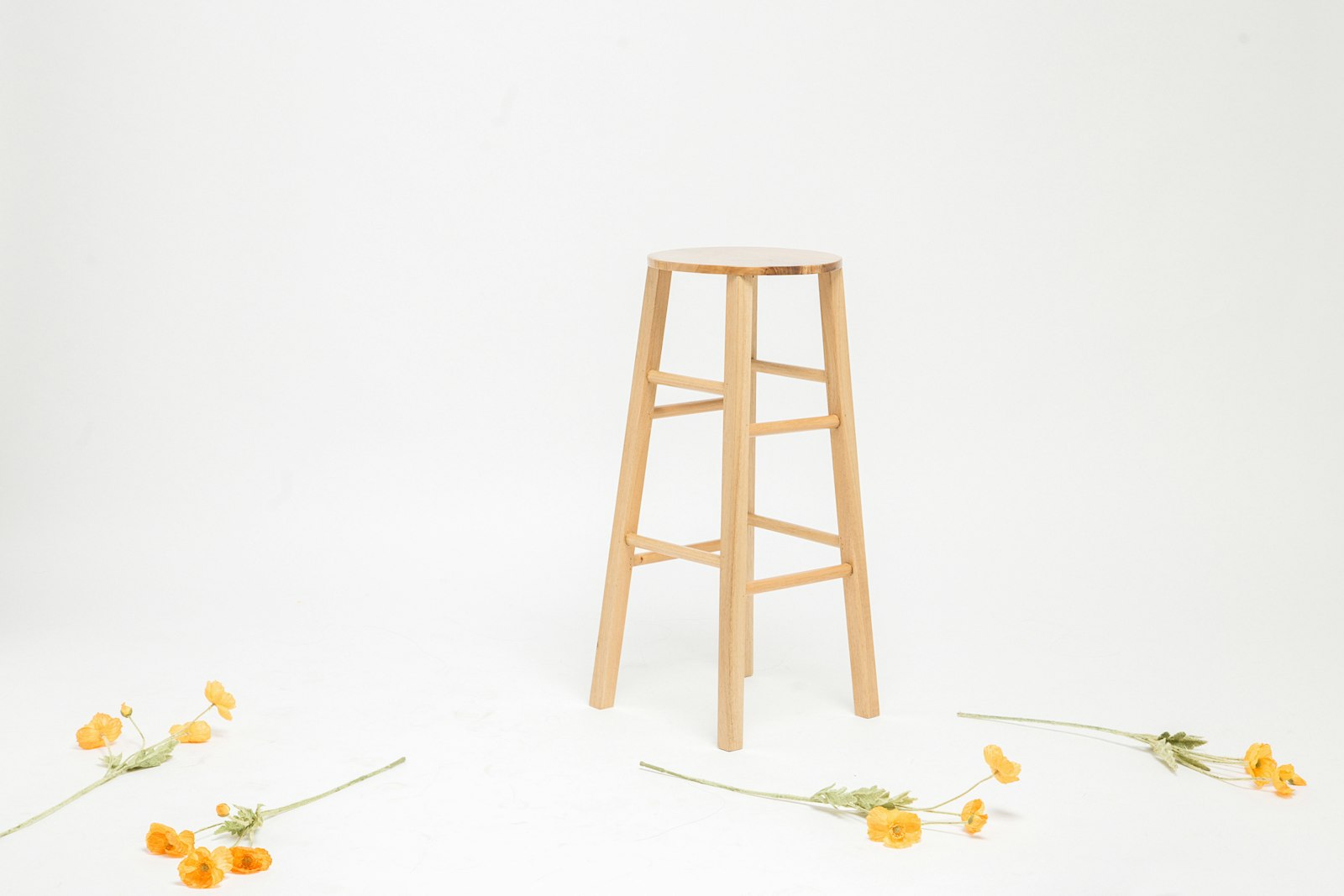 📷 a wooden stool
It can be done, but not by gluing loose Cheerios into stool shapes. The trick is to stop treating Cheerios as rings and start treating them as aggregate, the way gravel becomes concrete.
Your stool has a round seat, four legs that splay outward, and two rungs on each side bracing the legs. That bracing is what we will copy.
Materials. About 12 boxes of Cheerios, 3 quarts of PVA (wood) glue, plastic wrap, a large bowl or pot as a seat mold, four cardboard tubes as leg molds, and eight short tubes for the rungs.
Steps
- Crush two-thirds of the Cheerios to coarse crumbs. Mix with glue until every crumb is coated; it should pack like wet sand.
- Pack the mix into the four leg tubes, ramming hard as you go. Air pockets are where legs snap. Let cure 48 hours, then peel the tubes off.
- Pack the eight rung tubes the same way. Rungs are short, so they cure in 24 hours.
- Line the bowl with plastic wrap and pack the seat the same way, 2 inches thick. Press whole Cheerios into the top surface for looks, not strength. Cure 72 hours.
- Drill four angled sockets in the underside of the seat, splayed 10 degrees outward like the original, and glue the legs in.
- Drill sockets in the legs for the rungs at the two heights in the photo and glue the rungs in. This is the step that stops the legs from spreading under load.
- Seal everything with two coats of glue thinned with water. Cheerios are a sponge; humidity is the enemy.
Will it hold? Packed glue-and-crumb composite is strong in compression, which is what legs see. The seat is the risk; keep it thick and short-spanned. Sit down gently the first time.
AI looked at the stool and understood its structure: four splayed legs, two rungs per side, a round seat. Then it reasoned as an engineer about a material nobody has ever built with, and arrived at a real principle: crushed Cheerios bound in glue behave like concrete. The request was absurd. The reasoning was not. AI can turn a photo of almost any object into instructions for building it.
4. Simulate what is in a drawing
In the persona lesson, one sentence turned AI into an arcade machine that drew its screen and kept track of the game. A drawing can do the same job as that sentence. If we draw a game, AI can look at the drawing and simulate the game: run it, keep track of everything, and show us what happens.
Here is a maze game drawn on a whiteboard, with the rules written beside it.
Here is a picture of my arcade game. I am ready to play with the arrow keys.
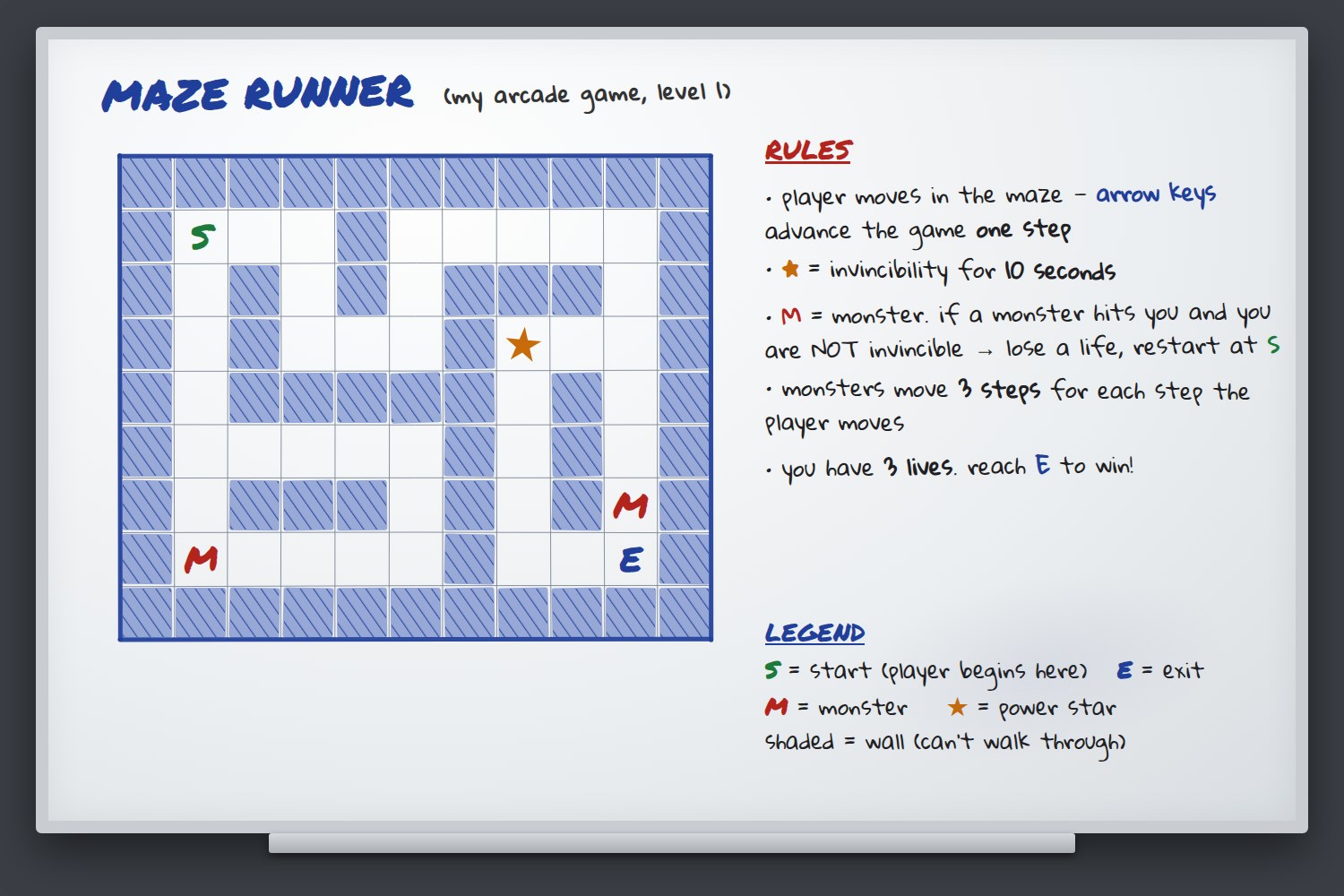 📷 the whiteboard with my maze game and its rules
Understood. I read the maze, the rules, and the legend from the board. Two things the board does not say, so I will assume them unless you tell me otherwise: monsters move toward you by the shortest path, and since we are playing in steps, "10 seconds" of invincibility means 10 of your moves.
Here is the board. You are P, starting on the S square. Walls are #. Lives: 3.
# # # # # # # # # # #
# P . . # . . . . . #
# . # . # . # # # . #
# . # . . . # * . . #
# . # # # # # . # . #
# . . . . . # . # . #
# . # # # . # . # M #
# M . . . . # . . E #
# # # # # # # # # # #
Your first move? You can go right along the top corridor or down the left corridor.
Move right.
You step right. Both monsters take three steps toward you.
# # # # # # # # # # #
# . P . # . . . . . #
# . # . # . # # # . #
# . # . . . # * . M #
# M # # # # # . # . #
# . . . . . # . # . #
# . # # # . # . # . #
# . . . . . # . . E #
# # # # # # # # # # #
What happened. The monster that started at the bottom left came up the left corridor three squares and is now four steps from you. The monster that started next to the exit climbed the right side and is now level with the star. No monster reached you. Lives: 3.
Watch out. If you stay in the top-left area, the left monster reaches you on your next move. Going down from here toward the middle keeps you ahead of it. The star is 12 steps away by the shortest route.
Your move?
We drew the game. AI looked at the drawing, read the rules from the notes beside it, and built the board in ASCII from the picture. It ran the game: it moved the player, moved both monsters three squares by the rules, checked whether anyone collided, and reported what happened. It also told us the two things the board did not specify and what it assumed about them, which is exactly what a good programmer would ask about. AI turned a whiteboard drawing into a game we can play.
5. Extend a picture
We can also ask AI to extend a picture: to add to it or finish it. A schedule with only some things filled in is a picture that is waiting to be extended. AI can look at what is already there, work out the patterns behind it, and fill in the rest to match.
Here is what I have scheduled so far, and here is what I still need to schedule with how long each takes. Schedule the rest based on the preferences you can see in what I already have.
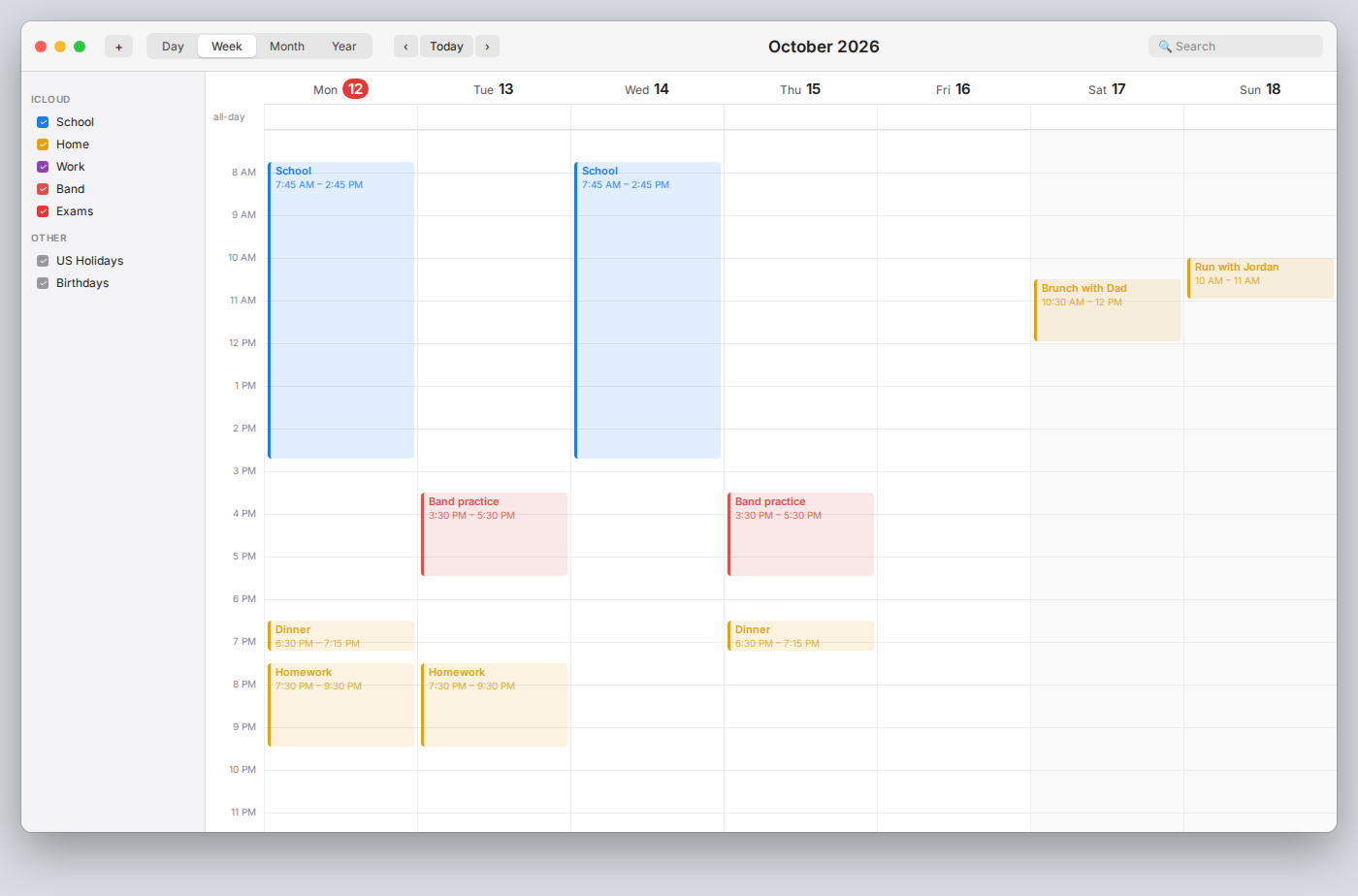 📷 my calendar for next week
Still to schedule:
- Chemistry lab report, 2 hours
- Dentist, 1 hour, on a weekday (the office is open 9 to 5)
- Haircut, 45 minutes (the shop is only open Saturday, 9 to 5)
- Call Grandma, 30 minutes
- Workout, three times, 45 minutes each
- Read for English, three sessions, 30 minutes each
Here is what I can see in your calendar and what I am taking from it:
- School shows on Monday and Wednesday only, but it is a school week, so I am treating school as 7:45 to 2:45 every weekday.
- Band practice is Tuesday and Thursday, 3:30 to 5:30. Nothing is scheduled in those slots on other days, so Monday, Wednesday, and Friday afternoons are open.
- Dinner is at 6:30 on the days it is entered. I am assuming that is every night.
- Homework is 7:30 to 9:30 on Monday and Tuesday, so I am keeping every weeknight evening after 7:30 clear.
- On the weekend, nothing is scheduled before 10 AM, so I have kept the mornings free.
Schedule for the rest
| Day | Time | Item |
|---|---|---|
| Mon Oct 12 | 3:15 – 4:00 PM | Workout (1 of 3) |
| Tue Oct 13 | 5:45 – 6:15 PM | Read for English (1 of 3), between band and dinner |
| Wed Oct 14 | 3:15 – 4:15 PM | Dentist (office hours, no band) |
| Wed Oct 14 | 4:45 – 5:30 PM | Workout (2 of 3) |
| Thu Oct 15 | 5:45 – 6:15 PM | Call Grandma, between band and dinner |
| Fri Oct 16 | 3:15 – 4:00 PM | Workout (3 of 3) |
| Fri Oct 16 | 4:15 – 4:45 PM | Read for English (2 of 3) |
| Sat Oct 17 | 1:00 – 3:00 PM | Chemistry lab report, after brunch |
| Sat Oct 17 | 3:30 – 4:15 PM | Haircut (shop closes at 5) |
| Sun Oct 18 | 11:30 AM – 12:00 PM | Read for English (3 of 3), after the run |
The lab report is the one thing that needs a two-hour block, and Saturday after brunch is the only open stretch that is not a school night. If you would rather have it done before the weekend, Friday 4:15 to 6:15 is also open; I would then move the reading to Saturday.
AI did not just fill empty slots. It looked at the entries that were there and inferred rules from them: school every weekday, though only two days were entered; band on Tuesday and Thursday; dinner at 6:30; homework every school night; late mornings on the weekend. Then it placed each remaining item somewhere that fit those rules, and said why. It also said which assumptions it was making, so we can correct any that are wrong.
AI can extend anything that is unfinished. Give it half a floor plan, and it completes the other half to match what is there. Give it a comic with three panels, and it writes the fourth. Give it a drawn machine that stops at step four, and it designs steps five through seven.
Review of multimodal context
Multimodal context is context that is not just words. A picture is the most common kind. When we give AI a picture, it can use details we could not have typed, because it can see things we did not notice and things we did not know mattered. And it can see our physical situation, so its work fits where we are.
In this lesson we asked AI to do five things with pictures. These are examples of what we can ask, not a complete list.
- Extract information from the picture: a fridge became an inventory, a pile of receipts became an expense table.
- Interpret what is in it: a calendar became a study plan, a control panel became instructions, a handwritten trip list got a travel planner's review.
- Transform the picture into something new: ingredients became a recipe, a stool became build instructions.
- Simulate what is in a drawing: a whiteboard maze became a game we could play.
- Extend a picture that is unfinished: a half-filled calendar became a full week.
Each of these is a prompt we can reuse on anything we can photograph or draw. The camera and the pen are now ways to give AI context. We show it a picture and tell it what to do with what it sees.